·3 min read
Why a Smaller Connection Pool Makes Your Database Faster
I used to think more database connections meant better performance. I was wrong and the real answer surprised me.
A Real Scenario
Say you have 10,000 concurrent users hitting your app. How big should your connection pool be?
10,000? 1,000? 500?
Try 10. Yes, ten.
Why That’s Not a Typo
Your database is bottlenecked by three things: CPU, disk, and network not connection count.
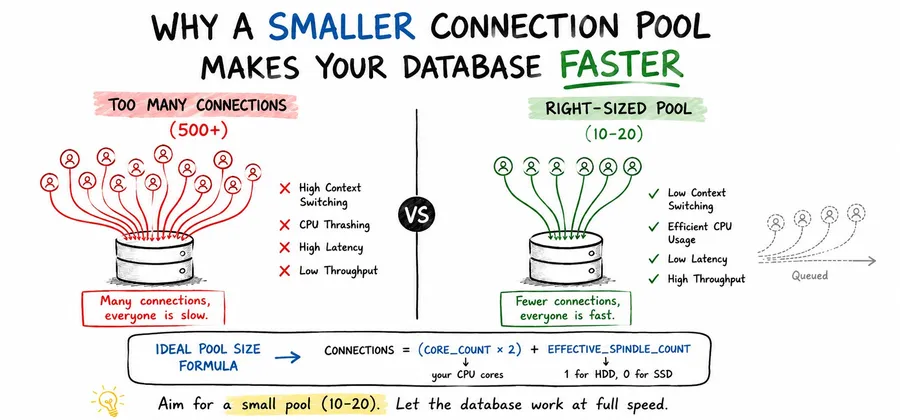
A 4-core server can only do four things at once. Throwing 500 connections at it doesn’t give you 500x throughput. It gives you 500 threads fighting over 4 cores, with the operating system burning cycles just switching between them. That overhead is called context switching, and it’s pure waste.
So Why Not Exactly 4 Connections?
Because of I/O wait.
When a query hits disk, that thread just sits there blocked, doing nothing, while the CPU sits idle. So it makes sense to let another thread step in and use that idle CPU time up to a point.
This is the reasoning behind a formula the PostgreSQL community has used for pool sizing:
connections = (core_count × 2) + effective_spindle_countFor a 4-core server with one HDD:
(4 × 2) + 1 = 9 → round up to 10For SSDs, the effective spindle count drops to 0, giving you 8. Faster storage means less blocking, which means you need fewer connections, not more. Counterintuitive, but it holds up: SSDs shrink the ideal pool size rather than growing it.
The Proof: Oracle’s 50x Improvement
Oracle’s Real-World Performance team demonstrated this live in a short video: they dropped a connection pool from 2,048 down to 96 connections. Response time went from roughly 100ms to roughly 2ms — a 50x improvement, with zero code changes. You can watch the demo yourself: Oracle Real-World Performance: Connection Pooling.
The Mental Model to Keep
Aim for a small pool — somewhere around 10 to 20 connections. Everything else queues and waits its turn. The database runs at full speed on what it can actually handle, and requests get served quickly, one after another.
Compare that to a huge pool where 500 connections all thrash the CPU simultaneously. Nobody gets fast service — everyone gets slow service, together.
Sources: HikariCP wiki — About Pool Sizing, Oracle Real-World Performance: Connection Pooling (video)
Note
Useful information that users should know, even when skimming content.
Tip
Helpful advice for doing things better or more easily.
Important
Key information users need to know to achieve their goal.
Warning
Urgent info that needs immediate user attention to avoid problems.
Caution
Advises about risks or negative outcomes of certain actions.